
Help
Yawcam -> Motion detection -> Actions -> Send E-mail
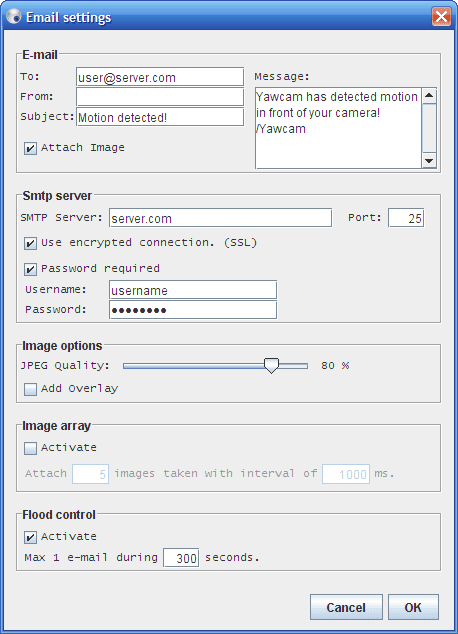
The settings for the e-mail action looks like this. Note that some settings will be hidden when not used. Which settings that are visible depends on how you select the other settings in this window.
To - The e-mail address you want to send the message to.
From - The e-mail address you want the message to come from. (If the receiver replies to the message, the reply will be sent to this address.)
Subject - The subject of the message.
Message - The content of the e-mail message.
Attach Image - Mark this checkbox if an image shall be attached to the e-mail. (Use the image array to attach more than one image.)
Smtp server
Smtp server - The server that actually sends the e-mail. (Check with your internet service provider which server you shall use.) If you have an gmail account can use the smtp server of gmail. More info about gmail here.
Port - The port number where your smtp server is running. (default is: 25)
Encrypted connection (SSL) - Some smtp servers require an encrypted connection. Mark this checkbox if your server requires this.
Password required - Mark this checkbox and enter username and password in the fields if your smtp server requires authentication.
Image options
Specify the quality of the image and if the overlay shall be added to the saved image or not. You can read more info about the text overlay and the image overlay on their settings page. The image options are only visible if the "Attach image" checkbox is marked.
Image array
If the image array is activated Yawcam will attach a sequence of images to the e-mail. Enter the number of images you want to attach and the delay between the images in milliseconds. (1000 milliseconds is the same as 1 second.) The image array options are only visible if the "Attach image" checkbox is marked.
Flood control
Activating the flood control sets a limit so maximum one e-mail message is sent during the specified interval. New e-mail messages will not be sent if the time set in the interval not has passed since last time an e-mail was sent.